Remindoo + Xero Integration
Authorize once, then sync contacts, invoices and payments with revenue account mapping you control.
Remindoo connects to Xero so accounting firms can sync contacts, invoices and payments between practice management and their ledger. During setup Remindoo requests specific Xero permissions, and firms then map revenue accounts, set the sync schedule and disconnect whenever they choose.
Last updated: September 16, 2026 · Reviewed by Waqas Sagar, ACA FCCA, chartered accountant (UK) and founder of Remindoo.
Key facts
- Connect and authorize with Xero from inside Remindoo
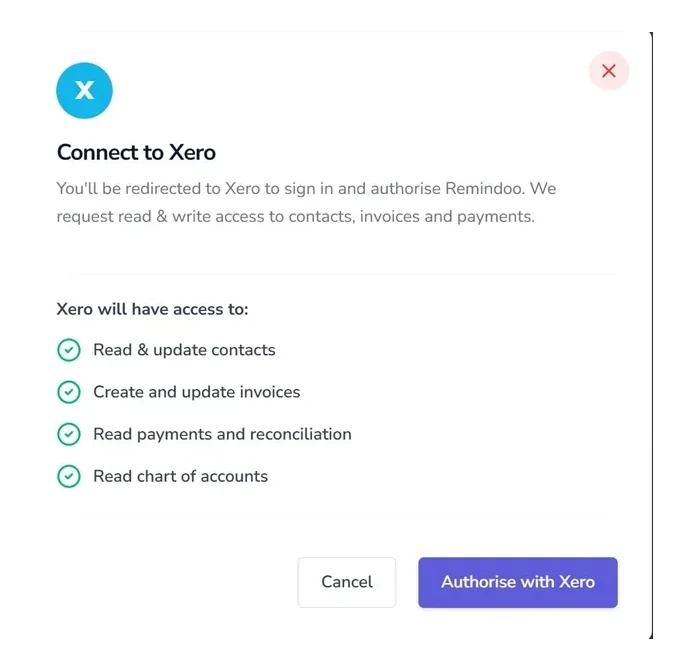
- Requested access: read and update contacts, create and update invoices, read payments and reconciliation, read the chart of accounts
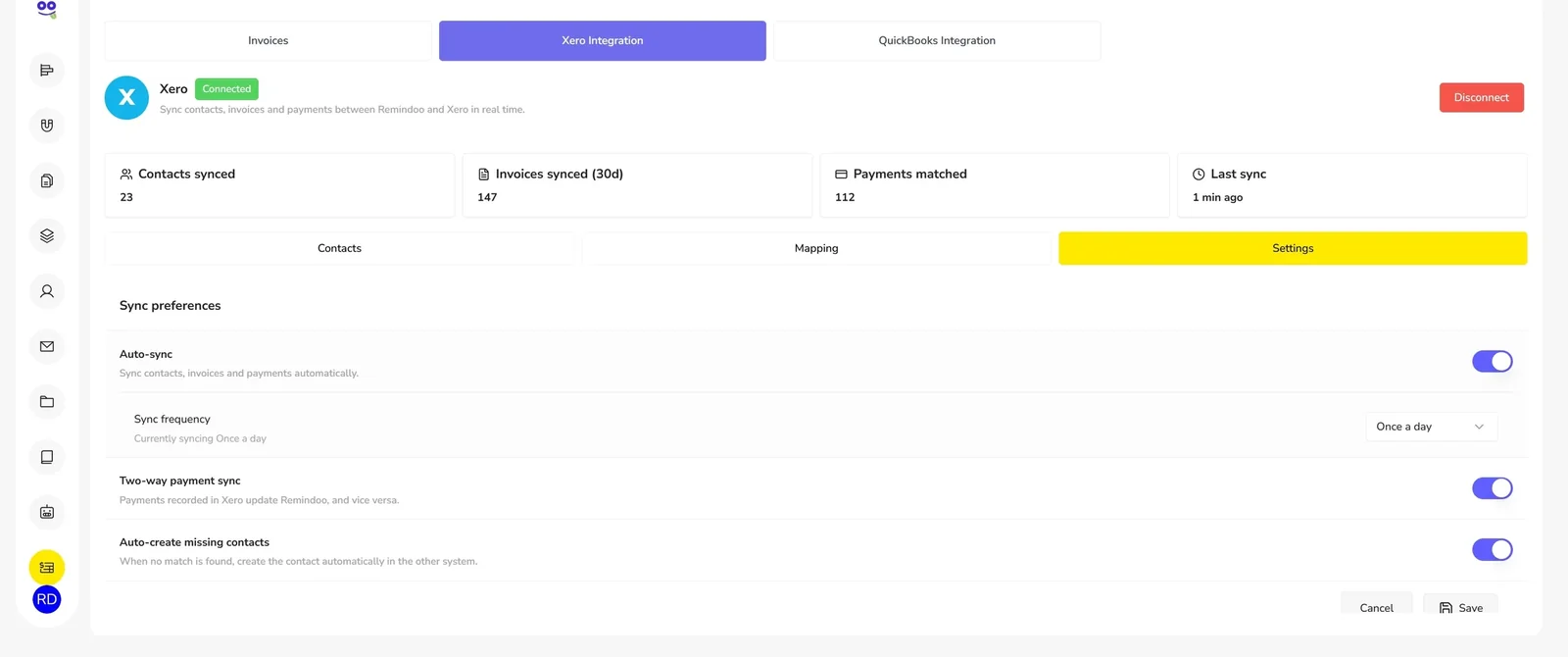
- Status panel shows contacts synced, invoices synced in the last 30 days, payments matched and last sync
- Mapping for a default revenue account plus service type to account
- Settings for auto-sync, frequency, two-way payment sync and auto-creating missing contacts
- Connection details visible, with a disconnect option
What goes wrong without a connection
Two contact lists
The client list in practice management and the contact list in Xero are maintained separately, and neither is reliably current.
Invoices rekeyed
An invoice raised against a job has to be entered again in the ledger, which is slow during busy periods and easy to skip.
Payments visible in one place
A payment recorded on one side does not clear the balance on the other, so the firm's receivables view is wrong.
How Remindoo handles it
| Problem | Workflow in Remindoo | Outcome |
|---|---|---|
| Separate contact lists | Contact sync with an option to auto-create missing contacts | One client list that both systems agree on |
| Manual invoice entry | Invoices raised in Remindoo sync to Xero on the schedule you set | No rekeying between practice management and the ledger |
| Payments out of step | Two-way payment sync, with a payments matched count on the status panel | Receivables that reflect what has actually been paid |
| Revenue coded inconsistently | Default revenue account plus per service type mapping | Predictable coding without invoice-by-invoice decisions |
How it works
Connect and authorize
Remindoo requests access to read and update contacts, create and update invoices, read payments and reconciliation, and read your chart of accounts. Review the list before approving it.
Map your revenue accounts
Set a default revenue account, then map each service type to the Xero account it should post to.
Choose your sync settings
Turn on auto-sync, set the frequency, enable two-way payment sync and decide whether missing contacts are created automatically. Connection details and disconnect sit on the same screen.
Want to see this against your own client list and service mix? Book a walkthrough and we will show the workflow end to end, then answer the questions specific to how your firm bills.
Book a demoFor US firms running on Xero
Xero has a smaller presence in the US than it does in other markets, but plenty of American firms and their clients run on it, particularly practices serving startups and businesses with international ties. Those firms should not have to give up an integrated ledger just because their practice management vendor only built for one accounting platform.
The Xero connection works the same way the QuickBooks one does: authorize, map the accounts, set the schedule, and let contacts, invoices and payments stay aligned. One point worth being precise about is the reconciliation permission. Xero groups payments and reconciliation into a single read scope, which is why it appears during authorization. Remindoo reads that data to match payments between the two systems, and does not perform bank reconciliation.
What syncs
| Data | Direction | Notes |
|---|---|---|
| Contacts | Both ways | Auto-create missing contacts is optional |
| Invoices | Remindoo to Xero | Invoices synced in the last 30 days are counted on the status panel |
| Payments | Both ways | Controlled by the two-way payment sync setting |
| Revenue accounts | Mapping only | Default account plus one per service type |
What each Xero permission is for
| Permission | Why Remindoo asks for it | What it does not mean |
|---|---|---|
| Read and update contacts | Keeps the client list aligned in both systems | Remindoo does not delete your Xero contacts |
| Create and update invoices | Sends invoices raised in Remindoo across to Xero | Not a replacement for your Xero invoice records |
| Read payments and reconciliation | Matches payments so balances agree | This is a Xero permission scope, not a bank reconciliation feature in Remindoo |
| Read the chart of accounts | Lets you pick the revenue accounts to map to | Remindoo does not change your chart of accounts |
Remindoo vs manual double entry
| Task | Manual double entry | Remindoo with Xero connected |
|---|---|---|
| Adding a client | Enter it twice | Contact sync |
| Raising an invoice | Create it in Xero separately | Raised in Remindoo and synced |
| Recording a payment | Update both systems | Two-way payment sync |
| Coding revenue | Chosen invoice by invoice | Mapped per service type |
Frequently asked questions
Does Remindoo integrate with Xero?
Yes. Xero is available as an accounting integration from inside Remindoo, alongside QuickBooks. You connect and authorize from the Xero Integration tab, then manage contacts, account mapping and sync preferences in the same place. Connection details and a disconnect option are always available on that screen.
What permissions does Remindoo request in Xero?
Four scopes: read and update contacts, create and update invoices, read payments and reconciliation, and read the chart of accounts. Contacts and invoices keep the two systems aligned, payment access lets Remindoo match payments, and chart of accounts access is what makes revenue mapping possible. Xero shows the full list before you approve.
What syncs between Remindoo and Xero?
Contacts sync both ways, with the option to auto-create missing contacts. Invoices raised in Remindoo sync to Xero. Payments sync both ways when two-way payment sync is on. Revenue accounts are mapped rather than synced, with a default account and an optional account per service type.
How often does the sync run?
On the frequency you choose in the sync settings, with auto-sync switched on or off as you prefer. The status panel shows contacts synced, invoices synced in the last 30 days, payments matched and the last sync time, so you can confirm the schedule is running. Remindoo does not claim real-time syncing.
Can I map revenue accounts?
Yes. Set a default revenue account for everything, then override it by mapping individual service types to specific Xero accounts. That gives consistent coding across the firm and means the revenue analysis in Xero reflects the services you actually sell rather than a single catch-all account.
How do I disconnect Xero?
Disconnect from the sync settings screen, where the current connection details are also shown. You can pause the sync instead if you only want to stop it temporarily. Disconnecting does not remove your Remindoo invoices, clients or payment records, and invoicing continues to work without an accounting integration.
Related for US firms
Keep practice management and Xero aligned
Contacts, invoices and payments in step, with revenue mapped the way your firm codes it.
QuickBooks and Intuit are trademarks of Intuit Inc. Xero is a trademark of Xero Limited. Remindoo is not affiliated with or endorsed by Intuit or Xero unless stated.