Team Communication That Stays With the Work
Discuss a job inside the job — comments, @mentions and attachments on the task — and choose exactly which updates reach people.
Remindoo keeps internal conversation attached to the work. Every task has a comment thread with rich text, @mentions such as @Task Assignees, file attachments up to 4.5 MB and a comment filter. Notification Management then controls which of the task, lead and document notifications arrive in-app, by email, or not at all.
Last updated: September 16, 2026 · Reviewed by Waqas Sagar, ACA FCCA, chartered accountant (UK) and founder of Remindoo.
Key facts
- Every task carries its own comment thread, visible with the work.
- @mentions, including @Task Assignees, pull the right people into the thread.
- Comments support rich text and file attachments up to 4.5 MB.
- A comment filter helps you find the exchange you are looking for.
- Notification Management covers Task & Subtask (15 types), Lead (10 types) and Document (2 types).
- In-app and email are toggled separately for each type and for a whole group.
- Some notification types are in-app only, shown as N/A in the email column.
What team collaboration means in an accounting firm
Accounting teams do not mostly need a chat room. They need the question about a specific return to be findable next to that return, six weeks later, by a reviewer who was not part of the original conversation.
Internal email and chat fail at that quietly. The thread exists, the answer is in it, and nobody can find it when the file comes up for review. The work and the reasoning behind it live in different systems.
Putting the conversation on the task fixes the retrieval problem. The trade-off is noise, which is why notification control matters as much as the comments: people either get buried and stop reading, or they miss the one update that needed them.
The problem
Questions get lost in internal email
A query about a return is answered in a thread that never makes it back to the job, so the same question is asked again next season.
Reviewers cannot see the history
A reviewer opens a job with no record of what was queried, what the client said or why a judgment was made, and has to reconstruct it.
Notifications are all or nothing
Staff are either buried under every update in the firm or have turned email off entirely and miss the assignment that mattered.
How Remindoo handles it
| Problem | Workflow in Remindoo | Outcome |
|---|---|---|
| Conversation separated from the work | A comment thread on every task | The discussion is found where the job is |
| The right person never sees the question | @mentions such as @Task Assignees | The people on the job are notified directly |
| Supporting files sent by email | File attachments on comments, up to 4.5 MB | The document sits with the point it relates to |
| Long threads are hard to search | Comment filtering | The relevant exchange surfaces quickly |
| Too many email notifications | In-app and email toggled separately per notification type | Routine updates stay in-app; the important ones still email |
| Setting preferences one by one | Group-level toggles with collapse and expand | A whole group is switched in one move |
How it works
Comment on the task
Open a task and use the comment thread to ask the question, record the client's answer or note the judgment made. Comments support rich text, so a short list or an emphasized point reads properly.
Mention the people involved
Use an @mention — for example @Task Assignees — to bring the people working the job into the thread. Assignees are notified, so the question reaches them without a separate email.
Attach the supporting file
Attach a file to the comment, up to 4.5 MB, so the document and the discussion about it are in the same place rather than in someone's mailbox.
Filter the thread
On a job with a long history, filter the comments to find the exchange you need instead of scrolling the whole thread.
Open Notification Management
Notification settings are grouped into Task & Subtask, Lead and Document. Collapse or expand all groups to see the shape of what Remindoo can notify you about.
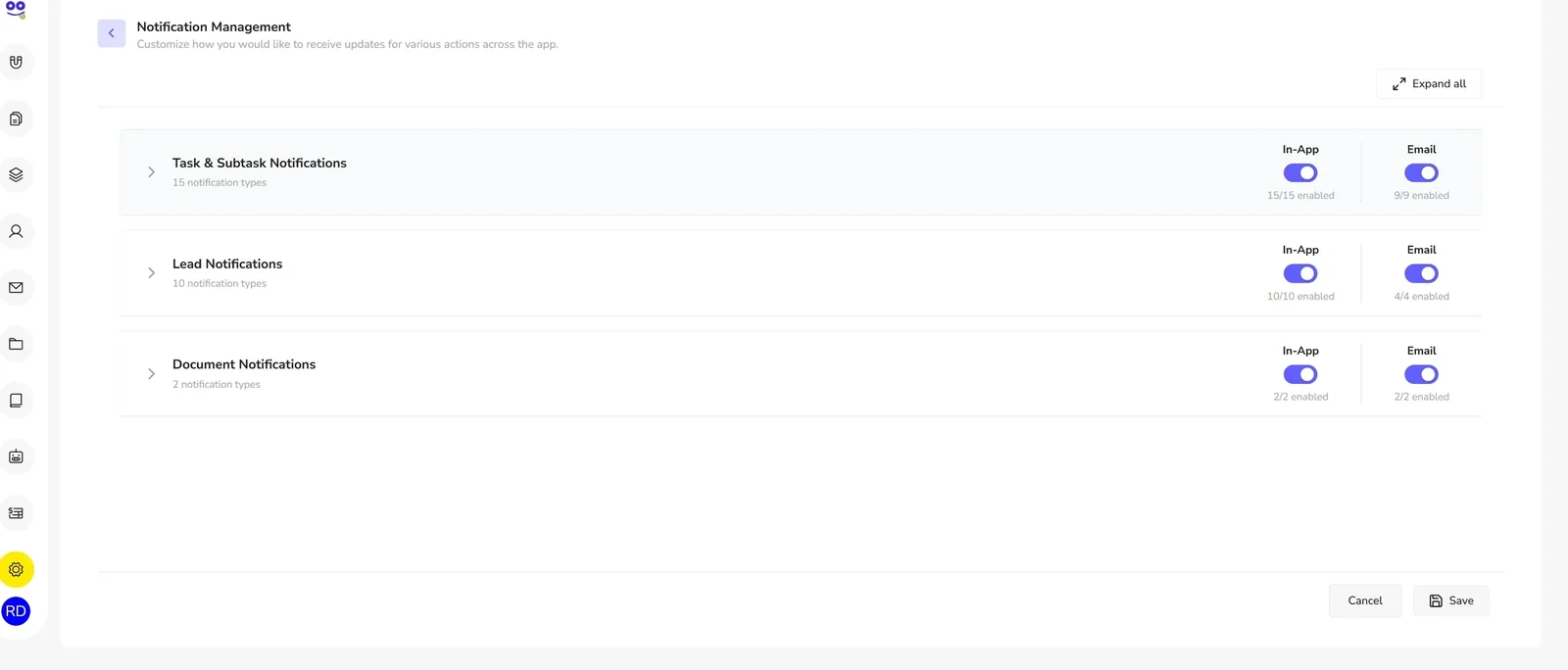
Review the types in each group
Task & Subtask holds 15 notification types, Lead holds 10 and Document holds 2. Each type shows its own In-App and Email setting, and some types are in-app only, shown as N/A in the email column.
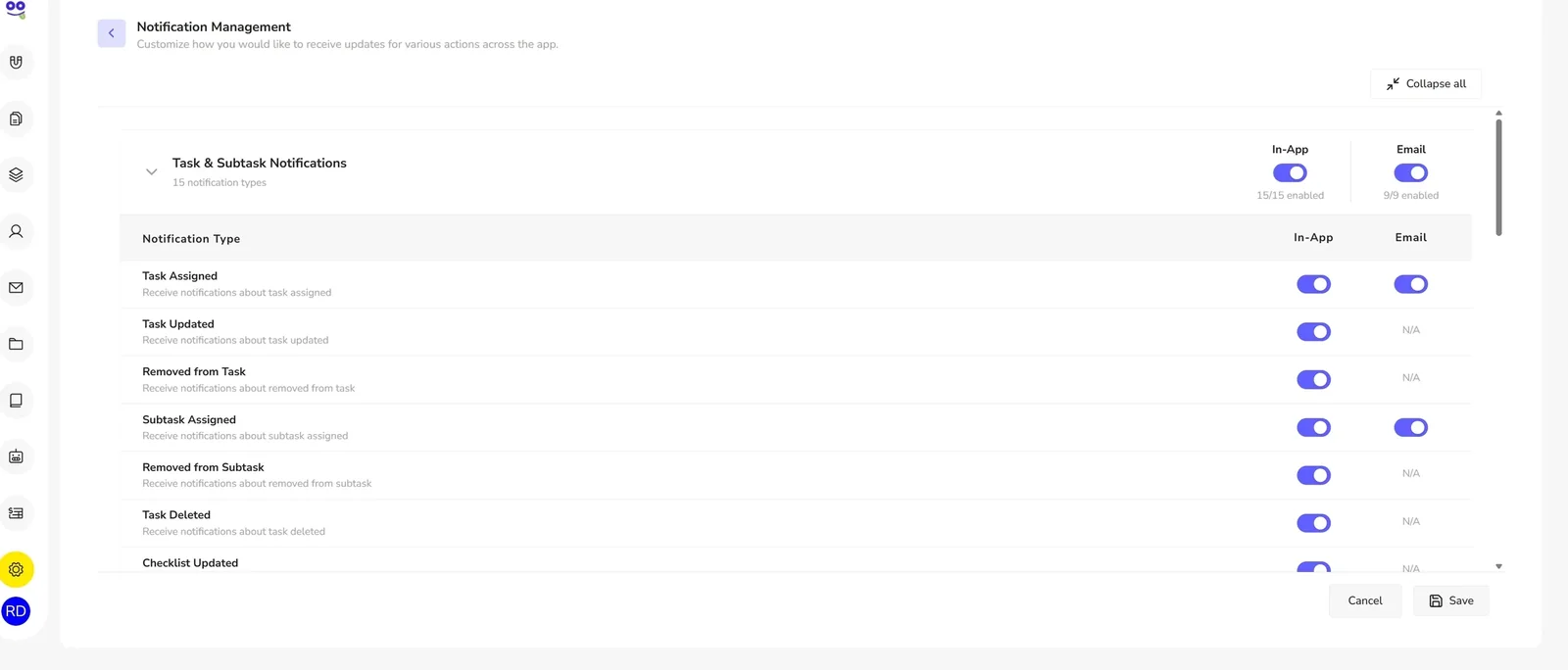
Choose the channel per type
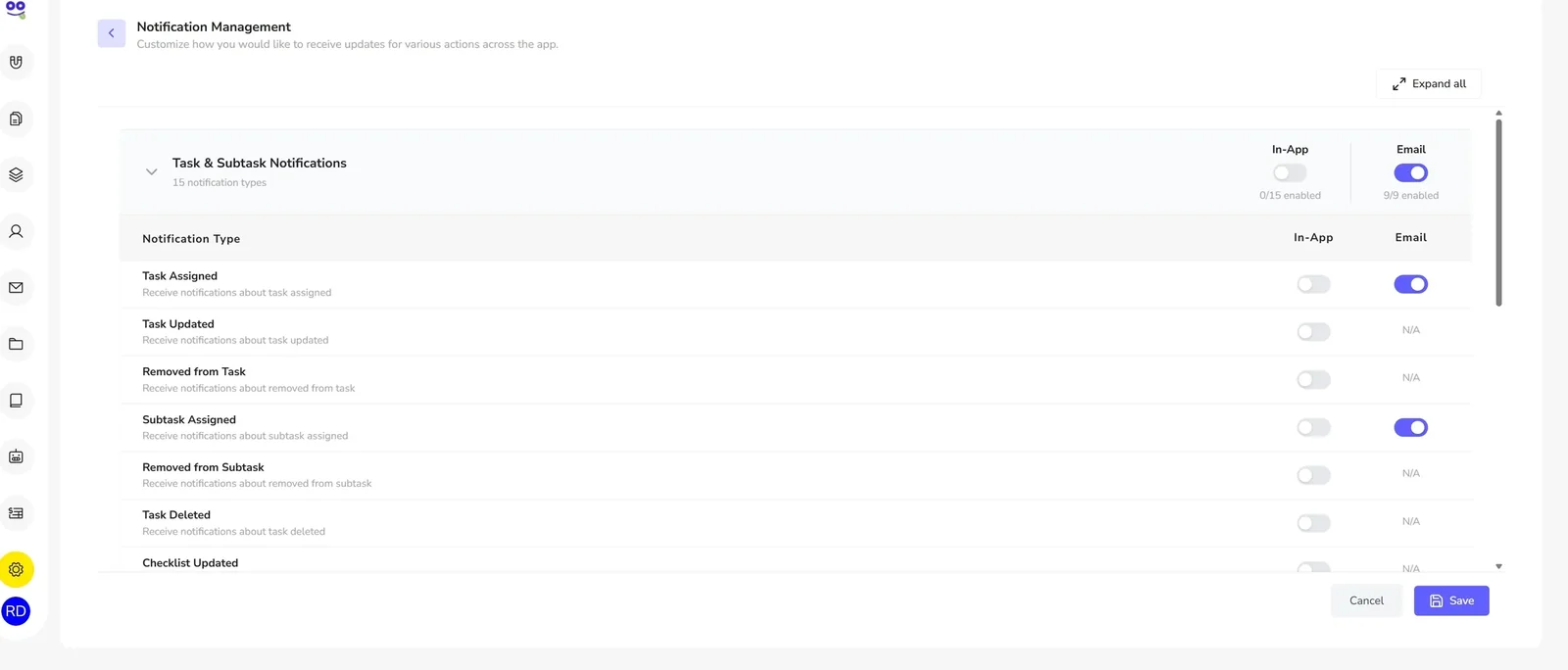
Toggle In-App and Email separately for a single type, or switch a whole group at once, then save. That is how a team keeps assignment emails while routine updates stay in the app.
Want to see comments, mentions and notification control on a real job? Book a walkthrough and we will run through a task end to end.
Book a demoWhy this matters for US firms
Busy season concentrates the problem. Between January and April a firm runs hundreds of jobs at once, with preparers, reviewers and partners touching the same returns, and the cost of a lost answer is measured in review time nobody has.
Seasonal and part-time staff sharpen it further. Someone who works ten weeks a year cannot absorb the firm's conventions from conversation. If the reasoning on last year's job is on the job, they can read it. If it was in a chat channel, it is gone.
Notification settings deserve a deliberate decision before the season rather than during it. Agree as a firm which updates justify an email, put everything else in-app, and revisit it once the volume actually arrives.
Remindoo vs personal inboxes, copy-paste templates and internal email threads
| What you need | Personal inboxes and pasted templates | Remindoo |
|---|---|---|
| Consistent branding | Each person's own signature, edited whenever the firm changes | One global header and footer applied to outgoing email |
| Reusable wording | Last year's message hunted down in someone's Sent folder | A template library with subject, category, status and rich-text body |
| Personalization | Names typed in by hand, with the occasional wrong one | Client tokens such as Client Name, Client Type, Company Name and Address |
| Where replies land | Whichever personal mailbox happened to send it | A reply-to address and sender name set for the firm |
| Checking how it looks | Send one to yourself and hope | Send Test Email from the composer before clients see it |
| Discussing a job | An internal email thread nobody can find six weeks later | Comments on the task itself, with @mentions and attachments |
| Who gets told | Everyone copied in, or nobody | Notification types toggled separately for in-app and email |
A tax-season notification set-up (example)
This is one example of how a firm might configure notifications before busy season, not a recommendation. Decide what your own team needs to be interrupted for.
Task Assigned and Subtask Assigned
Keep both in-app and email on. Being handed a job is the one update that should reach someone who is not currently looking at the app.
Task Updated
In-app only. Progress changes are worth seeing when you open the app and are rarely worth an email during busy season.
Document notifications
Turn them on for the people who actually handle client documents, and leave them off for everyone else.
Frequently asked questions
How can accounting teams reduce internal email?
Move the conversation onto the work. When a question about a return is a comment on that task, the answer is attached to the job rather than sitting in a thread. Notification settings then decide which of those updates justify an email, so the inbox carries exceptions instead of routine traffic.
Can I mention a teammate on a task?
Yes. Comments support @mentions, including group mentions such as @Task Assignees, which brings everyone working the job into the thread at once. Assignees are notified, so the question gets to the right person without you needing to know who picked the job up.
Can I attach files to a comment?
Yes. A comment can carry a file attachment up to 4.5 MB. That is usually enough for the statement, the screenshot or the signed form that the discussion is about, and it keeps the document with the point it relates to rather than in a separate mailbox.
Can I turn off email notifications but keep in-app alerts?
Yes. In-app and email are separate settings for each notification type. You can leave In-App on across a group and switch Email off for the types that do not need to interrupt anyone, then save. Some types are in-app only, and show N/A in the email column.
Which notifications does Remindoo send?
Notification Management groups them into Task & Subtask with 15 types, Lead with 10 types and Document with 2 types. Each type appears as its own row with In-App and Email settings, and groups can be collapsed or expanded so you can review the whole set quickly.
Can I change a whole group of notifications at once?
Yes. As well as toggling an individual type, you can switch a group's in-app or email delivery together, which is the practical way to set things up before busy season. Collapse and expand all makes it easy to move through the groups without losing your place.
Does this replace a chat tool?
It replaces the part of chat that should never have been in chat: discussion about a specific job. Comments live on the task, so they are still there at review and next season. General firm chat, quick availability questions and social conversation stay wherever your team already has them.
Where do comments fit with client communication?
Comments are internal and attached to the work. Client-facing messages are handled separately through email management, where the firm's branding, reply-to address, sender name and shared templates apply. Keeping the two apart means internal notes stay internal.
Related for US firms
Keep the conversation on the work
Practice management for US accounting firms. Unlimited users, priced per client, with a 60-day free trial.